One Repo, One Package: How We Structure Code for AI Agents
Most development practices were designed around people: how teams split work, review each other’s changes, and ship together. Now more and more of the code is written by AI agents, so we started from a different question. What structure makes an agent’s work easy to scope, easy to check and easy to undo?
Our answer is a methodology we call MWD (Microwise Development). It has one core rule:
One repo = one package.
Every package lives in its own Git repository. Packages stay small and do one thing. They depend on each other only through published, versioned releases, never through local paths like file:../.
Why this matters when agents write the code
An AI coding session works inside a boundary, and the useful question is what that boundary contains.
In a large shared codebase, an agent asked to fix one module can see, and often touch, everything around it. The change you asked for comes back mixed with changes you didn’t ask for. When something breaks, it is hard to say how far back you need to roll.
When the package is the repository, the boundary becomes concrete:
- Scope. An agent working on a package opens that repository. What is in front of it is the package and the versions it depends on.
- Parallelism. Two agents working on two packages are working in two repositories. They don’t share a working tree, so they don’t collide in one.
- Rollback. A package has its own history and its own releases. If a release is bad, consumers go back to the previous version.
You can approximate some of this inside a monorepo with conventions and tooling. We chose the repository boundary because git, CI, permissions and releases already respect it.
The rule is simple, but following it creates two practical problems right away.
Problem one: a lot of repositories
If every package is a repository, you end up with many repositories: dozens at first, then more. A monorepo gives you structure for free, because folders nest. A flat list of repositories on a Git host doesn’t.
We didn’t want to give up the one-repo rule to get structure back, so we put the structure into the repository name instead. This is gitdot, a naming syntax that uses dots to express hierarchy:
gitlab.com/microwiseai/glpkg.cli
gitlab.com/microwiseai/glpkg.adapters.npm
gitlab.com/microwiseai/glpkg.adapters.pypi
gitdot reads those names as a tree: a glpkg group containing cli and an adapters group, which in turn holds npm and pypi. The hierarchy you would have expressed with folders in a monorepo now lives in the name, and so in the URL of every repository. It works on the Git hosts you already use, such as GitHub and GitLab. gitdot doesn’t host anything itself; it’s an organizing layer on top of the platform.
Here are our own glpkg repositories, first as GitLab lists them and then as gitdot shows the same repositories:
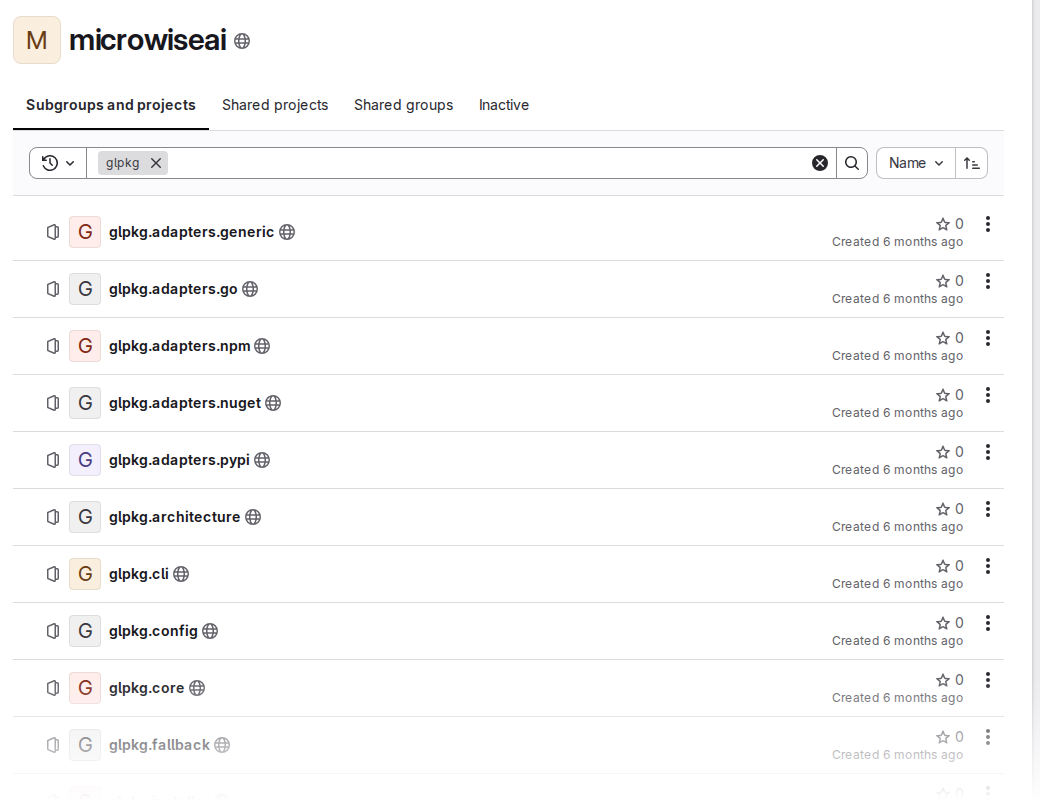 Before: GitLab shows a flat list.
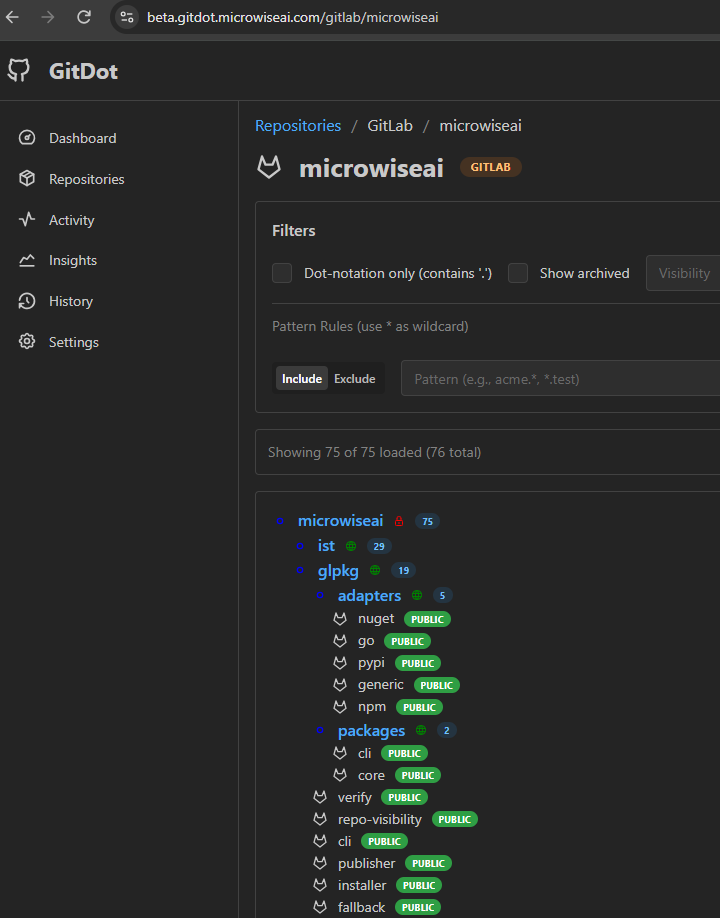 After: gitdot turns the dotted names into a tree.
With the structure in the names, grouping, listing and cloning “everything under glpkg.adapters” become operations on names.
Problem two: a lot of packages to publish
The second problem follows from the first. If packages depend on each other only through published versions, every package has to be published, often and in large numbers. A fix to one small package means a new release, and then consumers install that release.
Where do all those releases go?
The obvious answer is the public registries: npm, PyPI and the others. That doesn’t fit what we’re doing. Many of these packages are small internal building blocks. They’re useful to us, but they don’t belong in a public index that other developers search. Publishing hundreds of them would add noise to a shared space. It would also tie our naming to whatever is still free there, and many good names and scopes were claimed long ago.
What we wanted was a registry of our own that we could publish to as often as we like, under names we choose, without touching the public registries.
That’s what glpkg does. It publishes packages to, and installs them from, a GitLab package registry that belongs to your group. From the developer’s side (or the agent’s side), it feels like any other package manager.
Here’s a real example. git-nested is a small tool we built for this way of working. With one repo per package, a workspace fills up with Git repositories nested inside folders, and git-nested shows all of them as one tree in the browser, with each repository’s uncommitted changes updating as files change. We publish it with glpkg to our group’s registry, and because its repository (gitlab.com/microwiseai/mwd-tools.git-nested) is public, you can install it without a token. It’s a command-line tool, so it goes in globally:
npm i -g @glpkg/cli
glpkg install @mwd-tools/git-nested --group microwiseai -g
git-nested --help
--group tells glpkg which group’s registry to install from. glpkg takes care of the registry configuration and authentication, so installing one of our packages looks the same as installing a public one. It supports npm, PyPI, Go modules, NuGet and generic packages.
In our workflow the loop for a change is always the same: commit, publish a new version, install it where it’s needed. Agents follow the same loop as people, with the same commands.
Why GitLab
We looked at the usual candidates. Publishing everything to the public npm registry defeated the purpose. GitHub Packages integrates well with GitHub, but it has no generic package type for arbitrary artifacts. A self-hosted registry like Verdaccio handles npm only, and it’s one more server to run.
GitLab was the one product that gave us all of these together, on its free hosted tier:
- private packages
- several package formats plus a generic registry
- Git hosting and CI in the same place
GitLab doesn’t have the widest format coverage; dedicated artifact managers support more. For us, the combination mattered more. We’ll go deeper into this comparison in a follow-up post.
Wrapping up
MWD starts from one rule, one repo = one package, because it gives an AI agent a clear boundary to work in and gives us a clean unit to review and roll back. The rest of the tooling exists to make that rule livable: gitdot keeps many repositories organized, and glpkg keeps many packages flowing.
gitdot, glpkg and git-nested aren’t the only tools. Along the way we’ve built several others for working this way, such as linting and dependency checks, and we use them every day. Most of those are still internal. We hope to share more of them over time.
The rule has costs too. A change that spans several packages turns into several releases, and keeping versions aligned across repositories takes real care. We’ll write about those trade-offs as well.
If you’re working with AI agents on a codebase that keeps growing, we hope this gives you another way to think about where the boundaries go.