One Repo, One Package: Where the Review Trail Lives
In our first post on MWD we described the rule we build with: one repo = one package. Packages depend on each other only through published, versioned releases. At the end we admitted a cost: a change that spans several packages turns into several releases, and keeping versions aligned takes real care.
A reader replied with a good question:
I’d keep the package release and downstream version bump in the same review trail, so the interface change stays visible.
This post is our answer. We agree the change has to stay visible. We disagree that it needs one shared review trail.
Where the review trail lives
When a change in package A forces a change in package B, two decisions are made, in two places:
- A decides what changed and why, and releases it under a version tag.
- B decides which version of A to take and why, and pins it.
Both decisions belong in the commit history of the repository that made them. A’s commit says what the interface change is. B’s commit says “took A 0.1.1 because of X.” The pinned version number is the link between them: from B you can find the exact release of A, and from A’s tag you can find the commit that explains it.
So the histories stay separate, and each repository keeps a complete record of its own reasons, but the information isn’t cut off. You follow the version number from one history to the other.
To make this concrete, we’ll use a small example workspace, acme, built for this post. It has five repositories: a shared core package, a worker package that runs tasks and is deployed to production, a cli app, a dashboard app, and a worker-deploy project. The names, commits and versions are made up; the tool output further down is real, run against that workspace.
The change: core gets an optional task priority. Here’s how it moves through the repositories:
- core:
feat(core): optional task priority (low|normal|high, default normal), thenchore: release v1.3.0and tagv1.3.0. What the new field is and how it’s validated. - worker:
chore(deps): @acme/core lower bound ^1.3.0 (task priority),feat(worker): run high-priority tasks first, thenlock @acme/core 1.3.0and its own release,v0.5.0. - cli:
chore(deps): apply @acme/core 1.3.0,feat(cli): acme submit --priority <low|normal|high>, thenv0.4.0. - worker-deploy:
chore(deps): pin @acme/worker 0.5.0 (high-priority tasks run first)(more on this one below).
Why not one review space per change instead? Because the boundary isn’t clear. A change in core touches the worker and the cli; the worker takes core directly and is deployed by yet another project; the dashboard depends on core too but doesn’t need the new field yet. If every dependency edge gets a review space, you have to decide where each one starts and ends, and the number of spaces grows with the number of edges, not the number of packages. We would rather keep one rule that scales: every repository explains itself, and versions connect them.
What goes wrong if you do it naively
The rule alone doesn’t make any of this easy. If you follow one repo = one package and change nothing else, you hit four problems quickly:
- The story scatters. One change produces commits in four or five repositories. Each history is fine on its own, but nobody sees the whole sequence.
- You don’t know who is affected. When core changes, which packages depend on it, and which of them need a new release?
- Versions drift. Some packages pin the new version and others still ask for the old range. It isn’t always a bug, but you have to look.
- Local, installed and deployed copies disagree. The code in your working tree, the version installed on your machine and the version running in production can all be different, and nothing tells you.
None of these are reasons to give up the rule. They are reasons to make the connections visible. Here are the tools we use for that. The output below is real, run against the example workspace from the change above; its root path is shortened to ~/acme.
Keeping the hierarchy: nested repos, two views
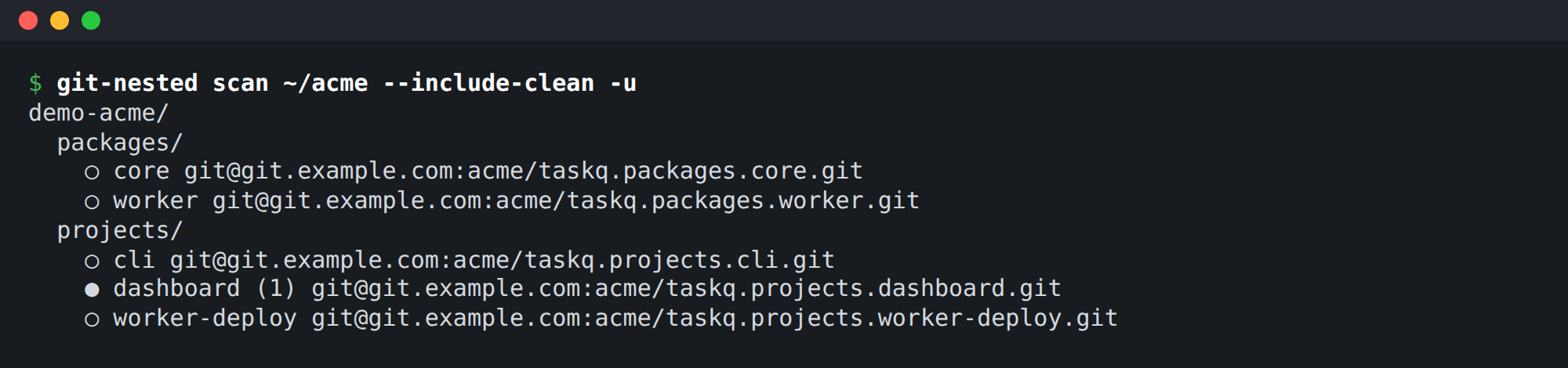
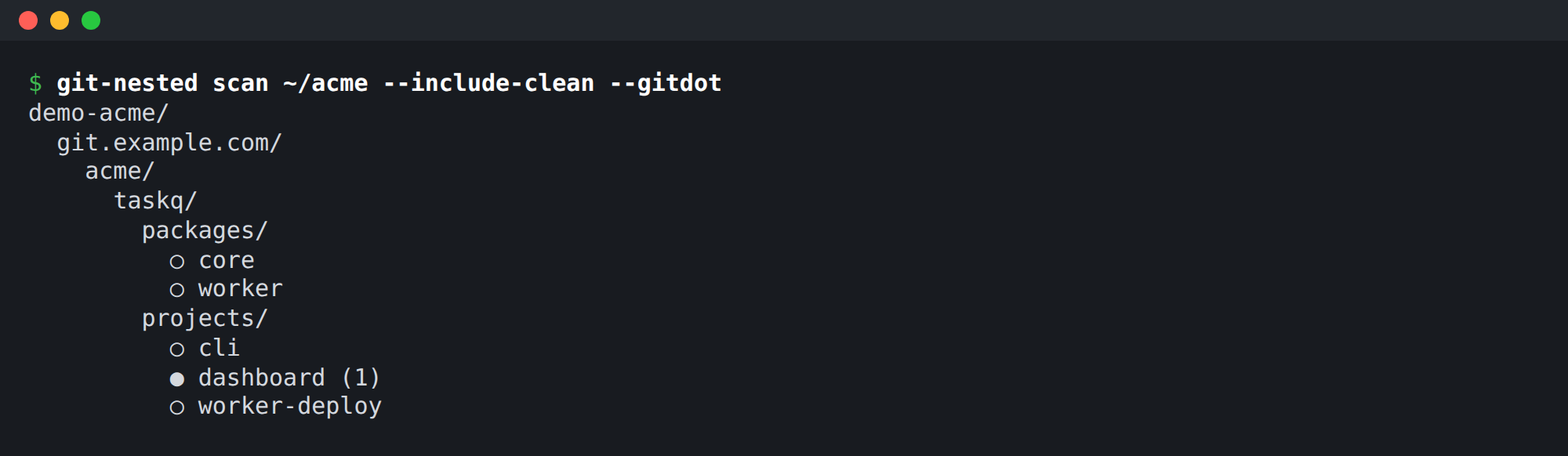
Splitting into many repositories doesn’t mean giving up structure. A workspace still nests: a packages/ folder for libraries, a projects/ folder for apps, and each entry is its own Git repository. The gitdot names from the first post carry the same structure into the remote: packages/core on disk is acme/taskq.packages.core on the Git host.
git-nested, which we introduced last time as a live view of changes across nested repositories, can show the workspace from either side. By folder, with each repository’s remote:
And by repository name, splitting each gitdot name on its dots:
The web view shows the same thing side by side: the repositories by local path on the left, and by remote URL on the right.
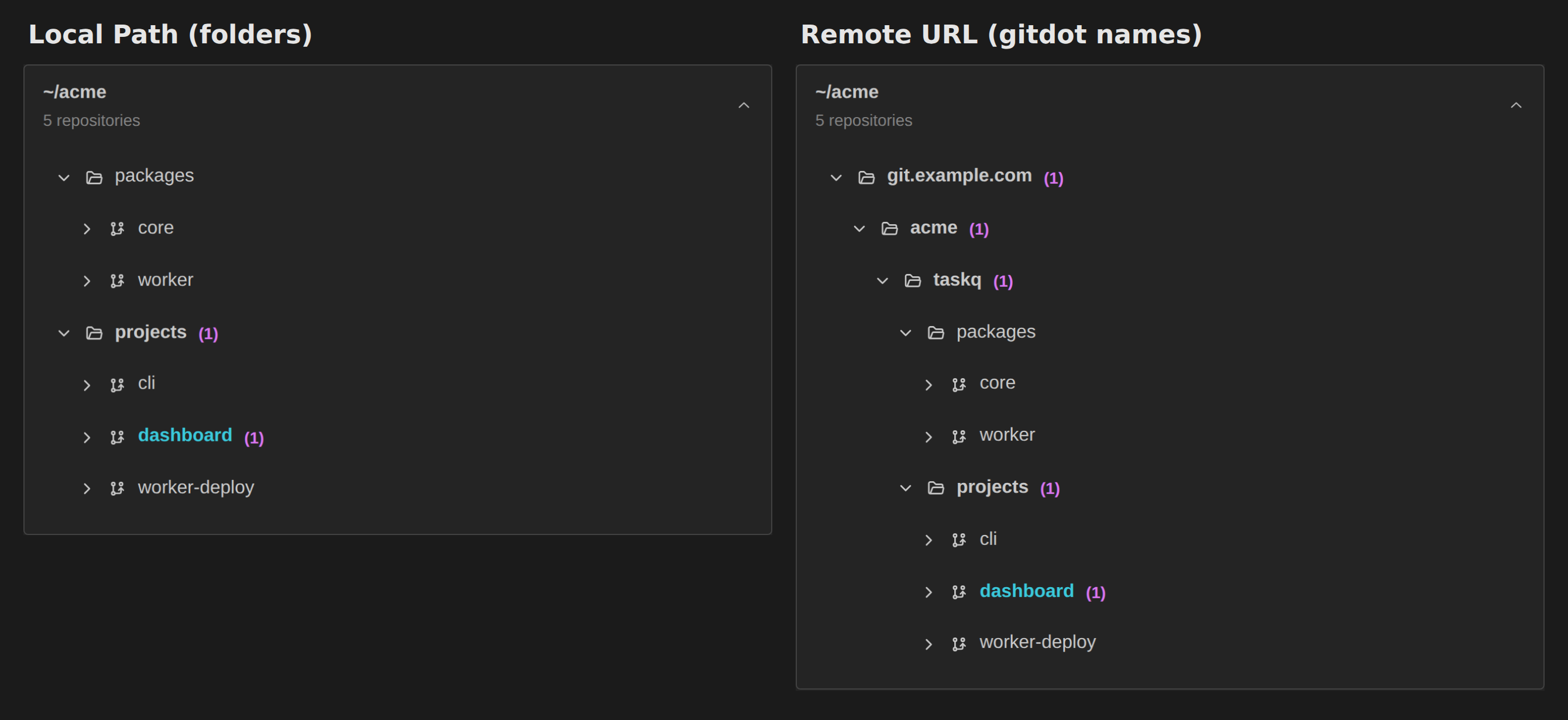
The same hierarchy comes out of both the folders and the repository names. Neither depends on the other: clone by name and you can rebuild the folders; look at a folder and you know the repository’s name. One repo = one package splits the code, not the structure. (The (1) on dashboard is one uncommitted file; we’ll come back to it.)
git-nested went through this split itself. It used to be one repository; it is now core, server and ui packages plus a cli project, each in its own repository. The original repository became the cli project rather than being replaced, so its history carried over intact, and the new packages start with their own histories. The cli’s commit says it is now assembled from them, and its dependencies name the versions it takes. That’s the pattern of this post on a small scale: independent histories, connections kept.
Following one change across repos: cscan
cscan collects commits from every repository under a folder into one timeline. Here it is for the change above, the day core added task priority, grouped by repository (times in UTC):
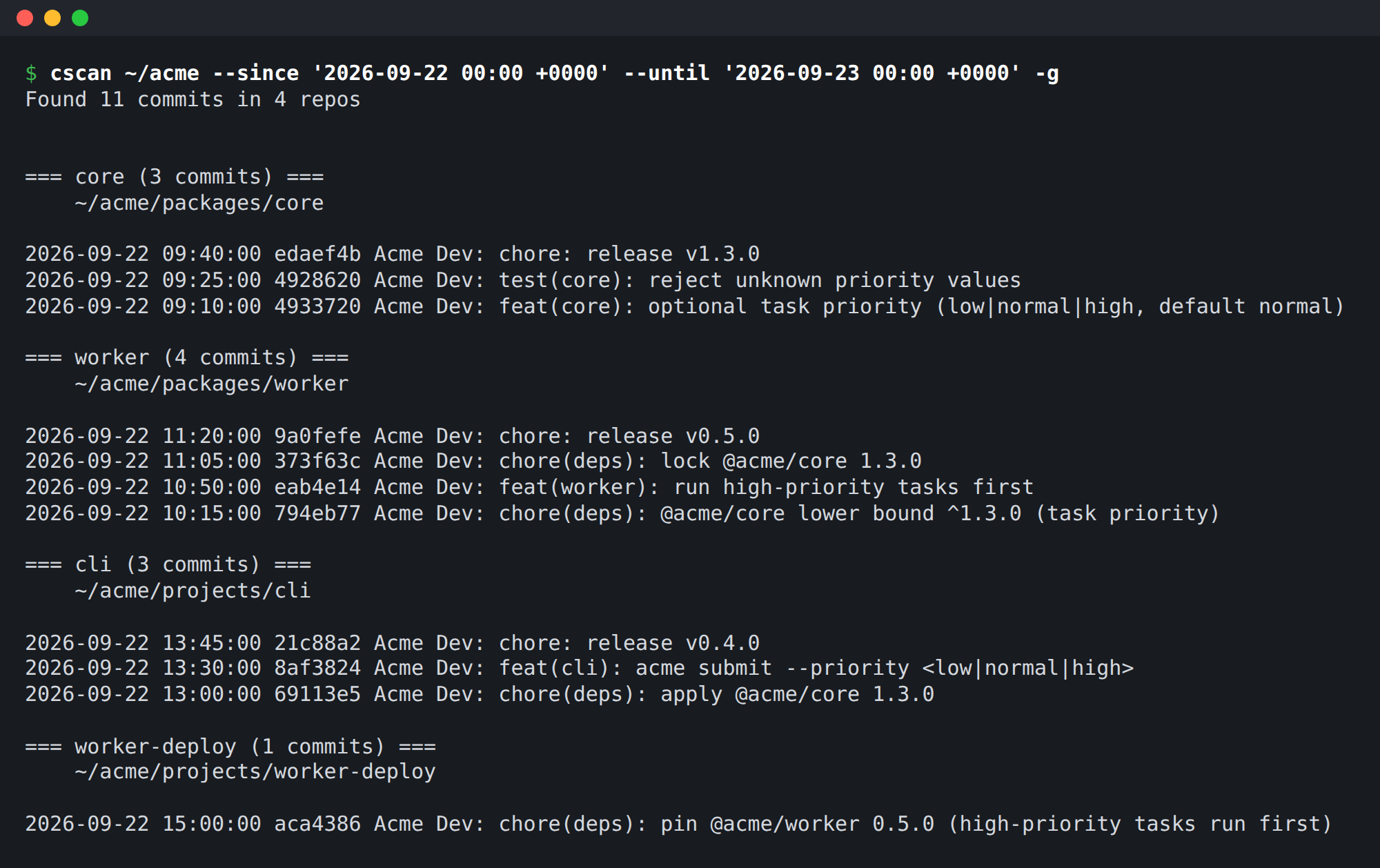
Each line is still a commit in its own repository, with its own reason. cscan doesn’t merge anything. It puts the separate histories next to each other so you can read the whole sequence: core added the feature and released, the worker raised its lower bound, then locked the new version and released, the cli followed, and the deploy project pinned the released worker.
Who is affected, and are versions aligned: mwd-deps
mwd-deps reads dependency declarations. sync-check looks at every local package in a folder and reports where packages ask for different versions of the same dependency:
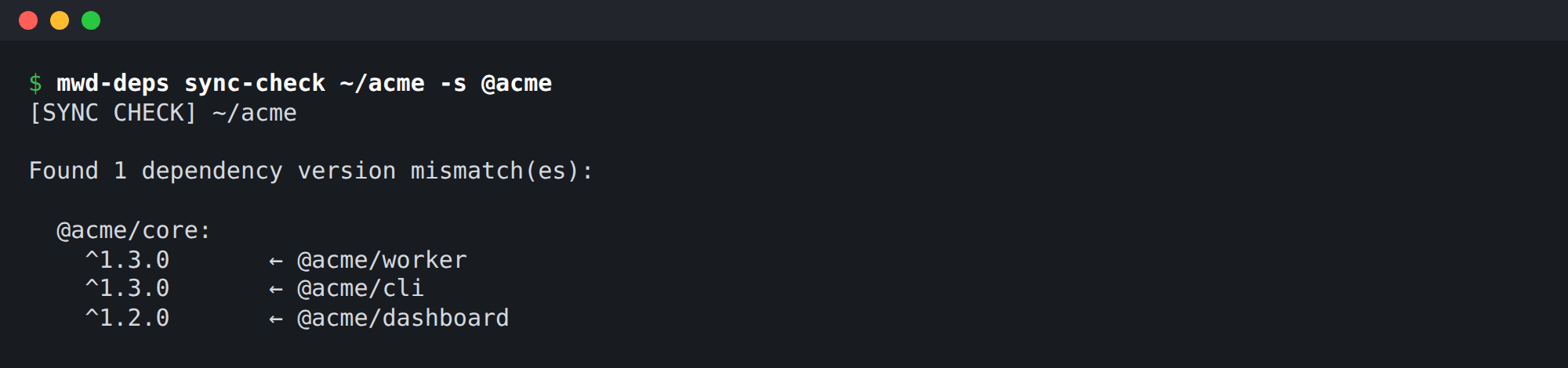
This doubles as the answer to “who depends on core?”: every package that declares it is listed, along with the range it asks for. Not every mismatch is a bug. ^1.2.0 still accepts 1.3.0, so the dashboard can still end up with the new version installed. But the list shows exactly where a decision was made and where it wasn’t yet. Here the dashboard is the one that hasn’t decided, and it’s also the repository git-nested showed with uncommitted work: someone is in the middle of adding the priority column. When that lands, its commit should say which version of core it now needs, and why. mwd-deps also has dependents and impact commands that answer the same question from the package registry.
Local vs installed vs published: verscan
verscan walks a folder and compares, for each package, the version in the working tree, the version installed as a command on the machine, and the latest published version in the registry. Nothing in the example workspace is published, so there’s nothing useful to show here, but on a real workspace it lists the packages where the three disagree: a release that was never published, a CLI that’s installed globally at an older version, a --version flag that prints the wrong number.
Most of what it finds is expected, such as an app that’s never meant to be published. The point is that the three versions are checked, not assumed.
A common mistake: deploying what wasn’t released
The worker package is what runs in production. The tempting way to ship a change is to deploy straight from its working tree, then release. In the example workspace, that’s how the previous worker release went:
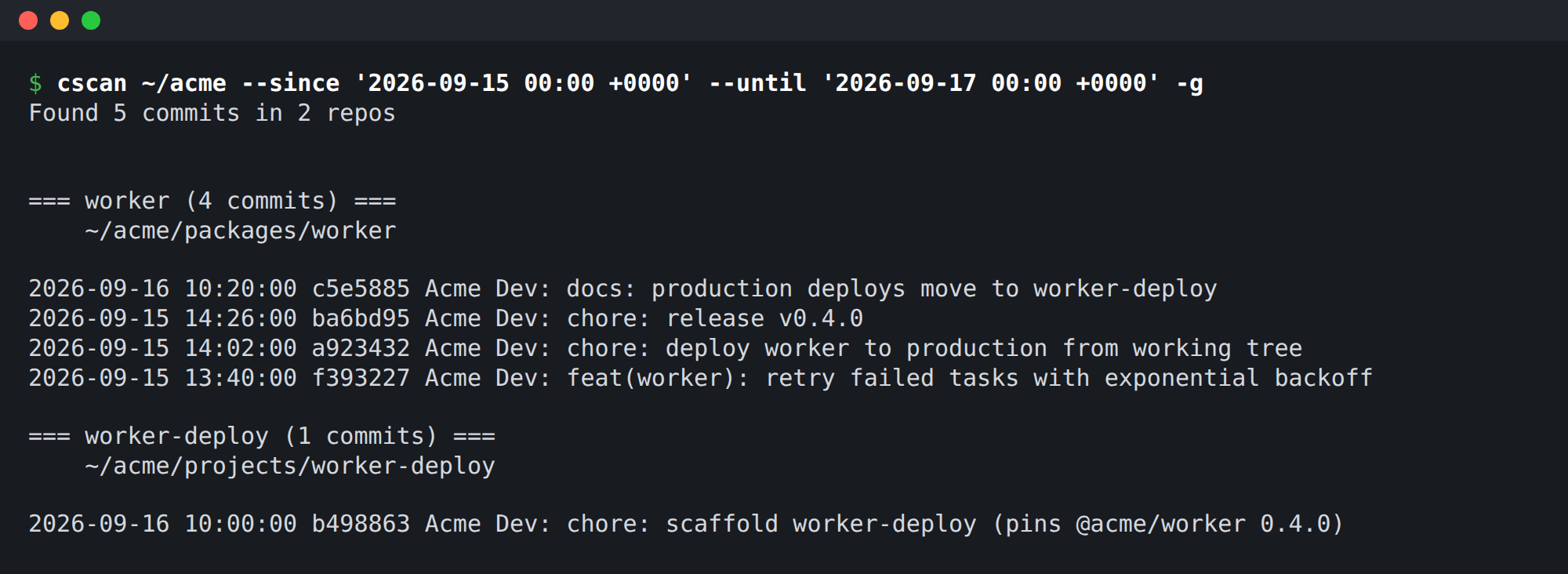
The deploy commit comes 24 minutes before the v0.4.0 release. For those 24 minutes, production ran code that existed only in a local checkout. Even if the release that follows differs only in its version number, the rule is broken: the deployed worker has no published version to point to, so the trail from “what’s running” back to “which release, and why” is missing. And nothing forces the release to match what was deployed.
The fix is structural, not a reminder. A separate deploy project, worker-deploy, doesn’t contain the worker’s code. It installs a published, exactly pinned version of @acme/worker and deploys only that. Upgrading the worker then means: release the package, bump the pin in the deploy project with a commit that says why, then deploy. That’s the last line of the earlier timeline: pin @acme/worker 0.5.0 (high-priority tasks run first), after the worker’s v0.5.0 release. The deploy project’s history is the record of what ran in production, and each entry points to a release.
That’s the same pattern as the rest of this post: the deployment becomes one more repository that writes down which version it took.
Wrapping up
One repo = one package means a cross-package change leaves several commits in several histories. We think that’s fine, as long as each repository records its own reason and the version numbers connect them. A shared review space for every dependency would be hard to define and hard to keep up.
What we needed instead was to make the connections visible: the hierarchy (git-nested), the timeline across repositories (cscan), who depends on what (mwd-deps) and which versions are actually where (verscan). These tools don’t change how the work is split. They let us read it as one story when we need to.